Ideogram

Ideogram

Ideogram is a state-of-the-art image generation platform built around its flagship model, Ideogram 4.0. It excels at generating visually coherent, high-fidelity images with a strong emphasis on reliable text rendering within the image itself—a notorious weakness in other diffusion models. Its core capabilities go beyond simple text-to-image, offering powerful in-painting, background removal, aspect ratio reframing, style consistency, and an API for product integration. Targeted at designers, content creators, and developers, it provides three main access layers: a hands-on web app for creators, a robust API for embedding generative workflows into products, and an MCP (Model Context Protocol) server for AI agents. The underlying model is notable for being open-source and weights are available, distinguishing it from closed proprietary alternatives.

Image Generation
Visit website
Added on
Jul 8, 2026
Ideogram 4.0Text generationImage editingInpaintingTransparencyOpen sourceAPIMCP
Product information

Everything worth knowing about Ideogram

The complete picture — from everyday features to the technical detail builders and IT folks dig for.

Core features

What it actually does

Advanced Text Rendering
Generates clear, coherent, and correctly spelled typography directly within images, surpassing overlay methods.
Editable Text Layers
Renders typography as separate, editable layers, allowing for restyling, repositioning, and refinement post-generation.
Inpainting & Image Editing (Prompt Edit, Magic Fill)
Revise images by describing changes in plain language (prompt edit) or seamlessly adding/replacing objects (magic fill) without rebuilding.
Native Transparency & Background Removal
Generates images with transparent backgrounds or provides a dedicated tool for cleanly removing backgrounds, making assets ready for use.
Extend & Reframe
Expand image compositions beyond the original crop or change aspect ratios while preserving the focal point and visual idea.
Technical capabilities
Diffusion Transformer (DiT) Architecture
Powered by a Diffusion Transformer model architecture, the core for high-quality, controllable image generation.
Open Source Weights
Model weights for Ideogram 4.0 are publicly available on GitHub and Hugging Face for local deployment, fine-tuning, and further development.
Must watch videos
Kittl AI vs Ideogram - Which Creates Better T-Shirt Designs?
31:36
Comparison31:36
Kittl AI vs Ideogram - Which Creates Better T-Shirt Designs?
Mastering T-Shirt Design Using Kittl and Ideogram AI | Step-by-Step Comparison and Workflow In this video, I put Kittl AI and Ideogram AI to the test using identical prompts to design T-shirts. Learn how to navigate these tools, compare features, and generate high-quality designs efficiently. Discover workflow tips, design techniques, and see the detailed process from prompt to finalized T-shirt design. Whether you're creating designs for fun or aiming to boost your business, this tutorial showcases the strengths of each platform and provides all the prompts and links used. Don't miss out on valuable insights to enhance your design skills and grow your business! 🔗 Try Kittl (affiliate, save up to 25%): https://www.kittl.com/features/ai/flows/?&utm_medium=collaboration&utm_source=youtube&utm_campaign=rjhustles_266866901183_1. Coupon Code: RJYT (25% off the first month or first year on all paid plans) Ideogram AI - https://ideogram.cello.so/bYjaTXRAHyj Prompts I Used: Cookie Baker - festive christmas baking theme, text “Official Cookie Baker,” decorated sugar cookies, gingerbread man, candy cane, snowflakes, playful typography, cozy holiday vibe, t-shirt vector illustration, centered layout, no background Pie For Two - thanksgiving dessert design, slices of pumpkin pie, apple pie, and pecan pie arranged on top, text “Pie for Two Please,” cozy fall aesthetic, warm brown orange tones, cute t-shirt vector art, centered layout, no background Dachshund Puppy - cute brown dachshund puppy tangled in christmas lights and holding candy cane, wearing santa hat — adorable holiday pet shirt, colorful vector art, dark background, christmas lights glowing effect 00:00 Introduction and Video Goals 00:33 Exploring Kittl AI Features 03:15 Diving into Ideogram AI 05:55 Comparing Kittl and Ideogram for T-Shirt Design 06:54 Generating and Refining T-Shirt Designs 11:09 Final Thoughts and Tips 15:59 Design Upload and Editing Tips 17:14 Using Kittl for Design Generation 18:05 Comparing AI Design Tools 18:45 Detailed Design Adjustments 24:57 Creating Mockups and Social Media Posts 29:37 Pricing Plans for Design Tools 31:06 Final Thoughts and Recommendations #kittlai #ideogramai #tshirtdesign
New BEST local AI image generator is here!
29:50
Tutorial29:50
New BEST local AI image generator is here!
Ideogram 4 tutorial. Best open-source AI image generator. Free & uncensored #ai #aitools #aiart #imagegeneration Thanks to our sponsor Higgsfield. Try Higgsfield MCP today https://higgsfield.ai/s/mcp-theaisearch-dxCxlV 0:00 Ideogram 4 intro 0:43 World knowledge 1:16 Text rendering 1:33 Prompt adherence 2:42 Bounding box feature 4:38 Incredible control 6:32 Comics and manga 8:13 Ideogram with ComfyUI 10:00 Higgsfield 11:37 Installing Comfy manager 13:24 Installing KJ nodes 14:55 Installing Ideogram models 17:51 How to use Ideogram workflow 19:45 Safety filter 22:05 Adding text and other settings 28:32 Benchmarks and license Workflow: https://drive.google.com/file/d/1rIotssI6EiA7buHzU0fmTZ2rQQnelaoz/view?usp=sharing Comfy manager: https://docs.comfy.org/manager/install KJ nodes https://github.com/kijai/ComfyUI-KJNodes Ideogram models: https://huggingface.co/Comfy-Org/Ideogram-4 More tutorials: ComfyUI tutorial https://youtu.be/g74Cq9Ip2ik Z-image tutorial: https://youtu.be/iNM5z8cCH8w Ernie image tutorial: https://youtu.be/A_nAU8h9YOY Newsletter: https://aisearch.substack.com/ Find AI tools & jobs: https://ai-search.io/ Support: https://ko-fi.com/aisearch Here's my equipment, in case you're wondering: Lenovo Thinkbook: https://amzn.to/4jWeKwH Dell Precision 5690: https://www.dell.com/en-us/dt/ai-technologies/index.htm?utm_source=AISearchTools&utm_medium=youtube&utm_campaign=precisionai#tab0=0 GPU: Nvidia RTX 5000 Ada https://nvda.ws/3zfqGqS Mic: Shure SM7B https://amzn.to/3DErjt1 Audio interface: Scarlett Solo https://amzn.to/3qELMeu
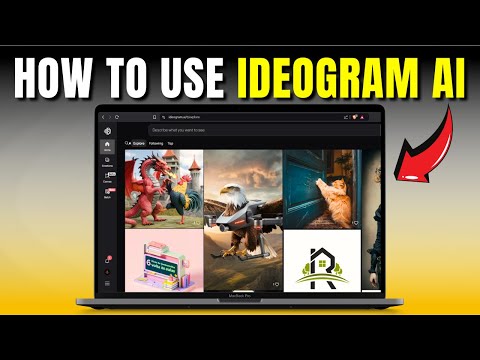
How to Use IDEOGRAM AI
2:20
Tutorial2:20
How to Use IDEOGRAM AI
How to Use IDEOGRAM AI #ideogramai #aiart #howtouseideogramai In this video, I am going to show you how to use Ideogram AI step by step. Ideogram AI is a powerful AI-powered tool for generating creative text and images with advanced deep learning models. Whether you're an artist, designer, or content creator, Ideogram AI can help you create stunning visuals and AI-generated text effortlessly. Learn how to use Ideogram AI for text-to-image generation, how to create AI art with Ideogram AI, and how to generate high-quality graphics with this innovative AI tool. This tutorial will guide you through setting up Ideogram AI, exploring its features, and optimizing its output for the best results. 0:00 - Intro 0:30 - How to Use IDEOGRAM AI Your subscription means a lot to me. Please consider subscribing here: https://tinyurl.com/5hkxtem8

Who uses it

Real use cases, no hype
Marketing & Advertising
Create compelling posters, banners, and campaign visuals with integrated text.
Brand Identity
Generate logos, brand assets, and visual guidelines with editable typography.
Print on Demand
Design t-shirts, mugs, and merchandise with clean, production-ready graphics.
Web & UI Assets
Generate icons, hero images, and interface elements with transparent backgrounds.
Social Media Content
Create eye-catching posts, covers, and stories with stylized text.
Character & Concept Art
Design consistent characters and fantasy scenes for games or media.
Photo Editing & Enhancement
Use 'Magic Fill', 'Remix', and 'Upscale' tools to edit and improve existing images.
What's great
  • Industry-leading text generation and rendering
  • Native transparency generation (no background removal step)
  • Excellent prompt fidelity and detail accuracy
  • Editable text layers with post-generation refinement
Technical strengths
  • Open-source weights (Ideogram 4.0) for flexibility
  • Advanced multi-modal diffusion architecture for composition
  • Robust fine-tuning infrastructure for custom models
Where it falls short
  • Higher computational cost for complex prompts
  • Potential for overfitting in custom-trained models
  • Limited control over exact character/object positioning
Technical limitations
  • Proprietary training data specifics not fully disclosed
  • Heavier model size compared to some specialized competitors
  • API rate limits on lower pricing tiers
For technical folks

The deep-dive specs

Core Architecture
Diffusion Transformer (DiT)
Model Availability
Open-source weights (Apache 2.0)
Access Layers
Web App, API, Model Context Protocol (MCP)
Primary Output
1024x1024 PNG (with transparency)

FAQ

Includes technical Q&A
Yes, there is a free tier with daily credits. Paid plans offer more generations and higher limits.

Traffic Insights

Monthly Visits

July 2026

Growth Rate

+0.06%

vs last month

Dominance

0.43%

in Image Generation

Top Country

United States

16.86% of traffic

Top Countries

United States
16.86%
Bangladesh
15.99%
India
13.58%
Brazil
4.58%
United Kingdom
3.63%

Growth Trend

Steady

Consistent user growth over last 6 months.

Honest pricing

No sneaky tiers, no “contact sales”

Here's who each plan is actually for — and where the hidden charges might hit.

Free
Free

Individuals

  • Limited daily generations
  • Basic access to editing tools
  • Watermarked outputs
Standard
$10/mo

Individuals

  • Increased generation limits
  • Priority access to latest models
  • Removed watermarks
  • Basic editing tools
Pro
Most picked
$15/mo

Professionals

  • High generation volume
  • Access to all editing tools (Extend
  • Reframe
  • Magic Fill)
  • Commercial use rights
  • Faster processing
Team
$50/mo

Teams

  • Shared workspace & projects
  • Centralized billing
  • Team member management
  • Includes all Pro features
Enterprise
Custom

Enterprise

  • Unlimited usage
  • SLA & dedicated support
  • Custom model training
  • SSO & advanced security
  • On-premise deployment options
Reviews

What the internet actually thinks

Data refreshed weekly. No paid placements.

Trustpilot
Not reviewed yet
G2
G2
Not reviewed yet
C
Capterra
Not reviewed yet
Product Hunt
Not reviewed yet
COMMUNITY COMMENTS

Leave a Comment

Help others make informed decisions. Your honest feedback shapes the community's understanding of this tool.

Tips for commenting

  • Be specific about features you used
  • Share real use cases and results
  • Mention both pros and cons
  • Keep it honest and constructive
Sign in to leave a comment

Your comment will be published after moderation

Filter by rating:
Sort by:

No comments yet

Be the first to share your experience with this tool.

Alternatives

Not quite the right fit?

Here's what else is out there.
Detail tags
Found via these searches
#ImageGeneration#OpenSource#DesignTools#DiffusionModel#TextInImage#API#CreativeAI